// Use caseSequencing and outreach ops
Account-based selling across email, LinkedIn and calls
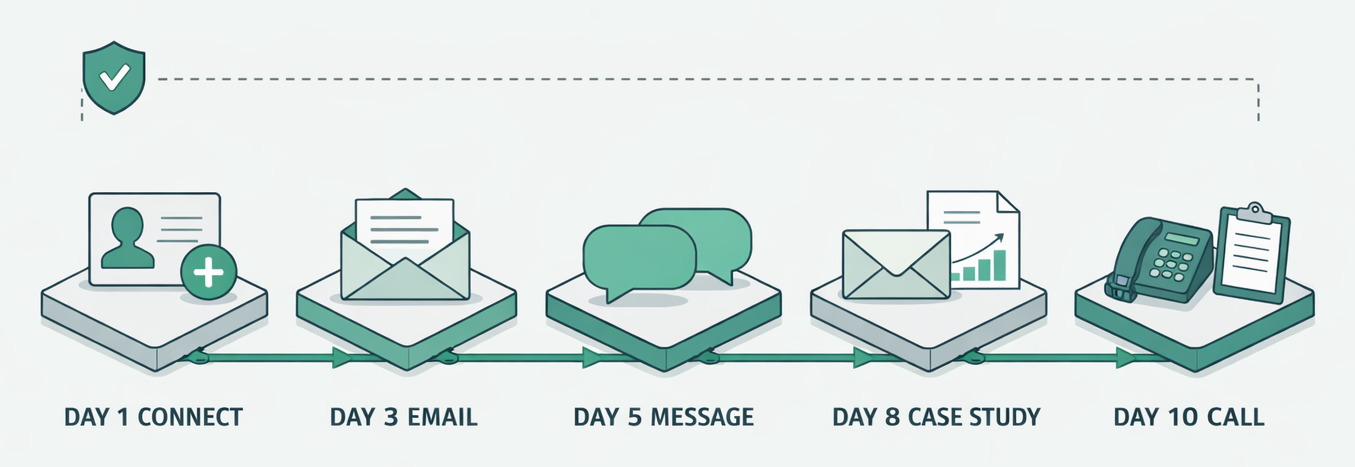
One prompt turns a list of 30 target accounts into a coordinated 10-day sequence: a LinkedIn connection, two emails, a LinkedIn message and a call, every asset drafted per contact and a one-page brief ready for the call. Emails load into your sender; LinkedIn notes wait for your approval.
30
Target accounts in the example
10 days
From first touch to the call
5
Touches across three channels
1
Call brief per account
For my 30 target accounts, build a coordinated 10-day sequence: day 1 LinkedIn connect, day 3 email, day 5 LinkedIn message, day 8 email with a case study, day 10 call. Draft every asset per contact, load the emails into Instantly, queue the LinkedIn notes for my approval, and write a one-page call brief per account.
TL;DR
- Account-based selling works when every channel knows what the others already said, and a separate tool per channel is the usual reason it does not.
- The Drevon prompt on this page drafts all five touches for every contact on 30 accounts in one session, so the day-8 email can build on the day-5 message.
- Emails load into your sending tool; LinkedIn notes stay as drafts you approve and send; the call gets a one-page brief per account.
- The sequence is a template you can rerun: change the account list or the day plan and paste the prompt again.
Account-based selling is the practice of choosing a short list of named accounts first and then working each one with outreach written for that company and the people in it. Drevon runs the whole sequence from one prompt in your own browser, and the Mac app is a free download. The example on this page takes 30 target accounts and builds a 10-day sequence with five touches across three channels: a LinkedIn connection on day 1, an email on day 3, a LinkedIn message on day 5, an email with a case study on day 8, and a call on day 10. Every asset is drafted per contact, the emails are loaded into your sending tool, the LinkedIn notes wait for your approval, and each account gets a one-page brief for the call.
Why account-based selling breaks across channels
Account-based selling breaks when the email tool, the LinkedIn tool and the phone each run their own script. The buyer gets a connection request that ignores last week's email and a call that repeats both. A coordinated sequence writes every touch from the same research, so each one refers to the last.
Most outreach sequences are built one channel at a time. The email steps live in a sender, the LinkedIn steps live in a spreadsheet or a separate automation tool, and the call is whatever the rep remembers on the day. Nobody wrote the three as one conversation, and the prospect notices. Stale Personalization Is Killing Your Outreach covers the research side of the problem: a first line written from a months-old data row reads like a template. The sequence side is the same failure spread over ten days.
The fix is to research each account once and write every touch from that research in the same session. That is what the prompt below does for 30 accounts at a time.
How to set it up
Setting it up takes a list of target accounts, a written day plan, connectors for your sending tool, and the prompt. The steps follow the order Drevon works in, and each one says what the agent keeps so the call brief on day 10 can use it.
Step 1: Pick the 30 accounts and the people in each
Start from a list you already trust: named accounts from your territory, the top of a scored list, or the output of the pipeline in How a Solo GTM Engineer Can Build a Full Outbound Pipeline. For each account, decide which two or three roles receive the sequence. If you only have the company names, the find-qualified-titles skill picks the right titles, and mapping the buying committee with parallel agents finds the people behind them.
Step 2: Write the day plan down
The day plan is the part a rep usually keeps in their head. Write it where the agent can read it, in a skill or a short document, so every run uses the same shape.
Day 1   LinkedIn connection request, no pitch
Day 3   Email 1: the account's trigger and one question
Day 5   LinkedIn message: follow up on the email, one sentence
Day 8   Email 2: a matching case study
Day 10  Call, with a one-page brief
Step 3: Connect the sending tool
The example sends email through Instantly. Drevon calls outreach, CRM and enrichment tools through MCP connectors, and the API keys live in Secrets, so they never appear in the prompt. If your team queues LinkedIn steps in a tool such as HeyReach, connect it the same way. If not, the LinkedIn drafts come back as a table you send from your own account.
Step 4: Paste the prompt
Tell Drevon For my 30 target accounts, build a coordinated 10-day sequence: day 1 LinkedIn connect, day 3 personalized email, day 5 LinkedIn message, day 8 email with a case study, day 10 call. Draft every asset per contact, load the emails into Instantly, queue the LinkedIn notes for my approval, and write a one-page call brief per account for day 10.
Drevon opens each company's site, recent news and the contacts' LinkedIn profiles in your browser, where you can watch it work, and keeps the source URL for every fact it uses.
Step 5: Approve the LinkedIn notes, then let the schedule run
Read the connection notes and messages before anything goes out. Edit the ones that sound wrong and delete any account you would rather not contact this month. Emails follow the schedule in your sender. Drevon runs sessions on a schedule and notifies you when an agent needs a decision, so a run can check replies and pause a contact who has already answered.
The 10-day sequence, touch by touch
Each touch has one job and refers to the one before it. The table shows what every step carries in the example and who presses send. The same research note feeds all five, which is why the day-8 email can mention the day-5 message without guessing.
| Day | Channel | What it says | Who sends |
|---|---|---|---|
| 1 | LinkedIn connection | A short note tied to the person's role, no pitch | You, after approval |
| 3 | Email 1 | The account's trigger and one question | Your sending tool, on schedule |
| 5 | LinkedIn message | A one-line follow-up that points to the email | You, after approval |
| 8 | Email 2 | A case study from a company like theirs | Your sending tool, on schedule |
| 10 | Call | Opens with the trigger, asks the question from email 1 | The rep, with the brief |
Five touches over ten days is the example, not a rule. Shorter cycles suit small deals and warm accounts; enterprise accounts often need a second round a month later. Change the day plan in step 2 and the prompt follows it.
What comes back for each account
Each account comes back as one folder of drafts and one brief. The drafts are the assets for every contact. The brief is what the rep reads before the day-10 call, and it keeps the links to every source the sequence used, so a claim in an email can be checked in one click.
This is the shape of the output, with placeholder values.
| Output | Contents | Where it goes |
|---|---|---|
| Research note | Trigger, recent news, stack, contacts, each with a source URL | Stays with the account |
| LinkedIn drafts | Day 1 note and day 5 message per contact | Approval table |
| Email drafts | Day 3 and day 8 emails per contact | Loaded into the sender |
| Case study match | Which story fits the account and why | Used in the day 8 email |
| Call brief | Who is on the call, what they have seen, three questions | Ready before day 10 |
A real brief from an earlier session is published as Call brief Ashim Dash, so you can see the format before you run your own. From Hours to Minutes: Automating Pre-Call Briefs with AI Agents explains how the brief is put together.
Account-based sales compared with a volume sequence
Account-based sales trades reach for depth. A volume sequence sends the same steps to thousands of contacts with a merge field for the company name. An account-based sequence sends fewer messages, each written from research on that company, across the channels where the buyer actually responds.
The table compares the two approaches on the points that decide which one to run.
| Volume sequence | Account-based sequence | |
|---|---|---|
| List size | Thousands of contacts | Tens of named accounts |
| Research per account | None, or one data field | A research note with sources |
| Channels | Usually email only | Email, LinkedIn and a call |
| Personalization | Company name and title | The account's trigger and history |
| Follow-up logic | Fixed steps | Each touch refers to the last one |
| What a reply needs | A template answer | A rep who knows the account |
Neither is better in general. Account based sales development makes sense when a single deal is worth the time of researching the account, and a volume sequence makes sense when it is not. Many teams run both: volume for the long tail, a coordinated sequence for the accounts that matter most this quarter.
What you need to run it
You need the Drevon Mac app, an AI plan it can drive, the account list, the day plan, and a connector for your email sender. There is no separate AI bill: Drevon runs on the Claude Code, OpenAI Codex, GitHub Copilot, Google Gemini or Antigravity plan you already pay for.
| Piece | Role in this workflow | What it costs |
|---|---|---|
| Drevon | Researches each account in your browser and drafts every asset | Free for Mac |
| AI plan you already have | The model behind the agents | Your existing plan |
| Email sender (Instantly in the example) | Holds the two emails and sends them on schedule | Your existing plan |
| LinkedIn tool, optional | Queues the LinkedIn steps if your team uses one | Your existing plan |
| Account list and day plan | Decide who gets the sequence and when | Your time, once |
Before the first send from a new domain, read Cold email deliverability when you do not own the sending domain. A coordinated sequence still depends on the email arriving.
Who uses this
The people who run this workflow sell to a known list of companies and want each account worked properly, without a week of preparation per campaign.
- Account executives with a named territory, who run the sequence on their top 30 accounts at the start of each quarter.
- SDR leads who give each rep the same 10-day shape and review the LinkedIn drafts in one place.
- Founders doing sales themselves, who have a short list of design partners to land and cannot afford a generic message.
- GTM engineers who own the outreach stack and want one prompt that coordinates the channels instead of three tools that do not share notes.
When this workflow is the wrong choice
This workflow fits tens of accounts where each deal justifies the research. It is the wrong choice when the list is long, when nobody will review the LinkedIn drafts, or when your team already works coordinated steps inside one platform.
- You are contacting thousands of people. A volume sequence in your sending tool reaches them faster, and account-level research for each one costs more time than the deal size repays.
- Nobody will approve the LinkedIn notes. The approval step is the safeguard for your LinkedIn account. Is LinkedIn Scraping Legal in 2026? covers why automated activity on LinkedIn needs care.
- Your reps already run multi-step sequences in one platform. If the team works every step inside a sales engagement platform such as Outreach or Salesloft, use Drevon for the research note and the call brief and keep the sequence where the reps already work.
- You have no case studies yet. The day 8 email depends on a story that matches the account. Without one, cut the sequence to four touches and add the case study step later.
Common questions
What is account-based selling?
Account-based selling is a sales approach where the team chooses a short list of named companies first, then researches each one and writes outreach for that company and the people in its buying group. It is the sales side of account-based marketing, and it usually runs across email, LinkedIn and calls instead of one channel.
What is the difference between account-based selling and account-based marketing?
Account-based marketing covers the campaigns aimed at target accounts, such as ads, events and content. Account-based selling is the direct outreach and conversations with the people inside those accounts. The two share a target list. This workflow is the selling half: the sequence a rep or founder runs on the accounts marketing already chose.
How many touches should an outreach sequence have?
This example uses five touches over ten days, across three channels, and each touch refers to the one before it. The right number depends on deal size and how warm the account is. Keep a touch only if it adds something new, such as a case study or a direct question, and stop when the contact replies.
Does Drevon send LinkedIn messages for you?
Not in this workflow. The prompt asks Drevon to draft the connection notes and messages and queue them for your approval. You send them from your own LinkedIn account, or load them into a LinkedIn outreach tool your team already uses. Emails are different: they load into your sending tool and go out on its schedule.
Can this run on more than 30 accounts?
Yes. Drevon runs sessions in parallel, so a larger list can be split into batches that research at the same time. The limit is review time, not the agent: every batch adds LinkedIn drafts someone has to approve, so size the list to what your team can read in a day.
See this run on your own accounts
Book a live demo and watch Drevon run this workflow against your ICP, with every claim in the output linked to its source.