// Use caseSignal-based outbound
Outbound lead generation from one prompt
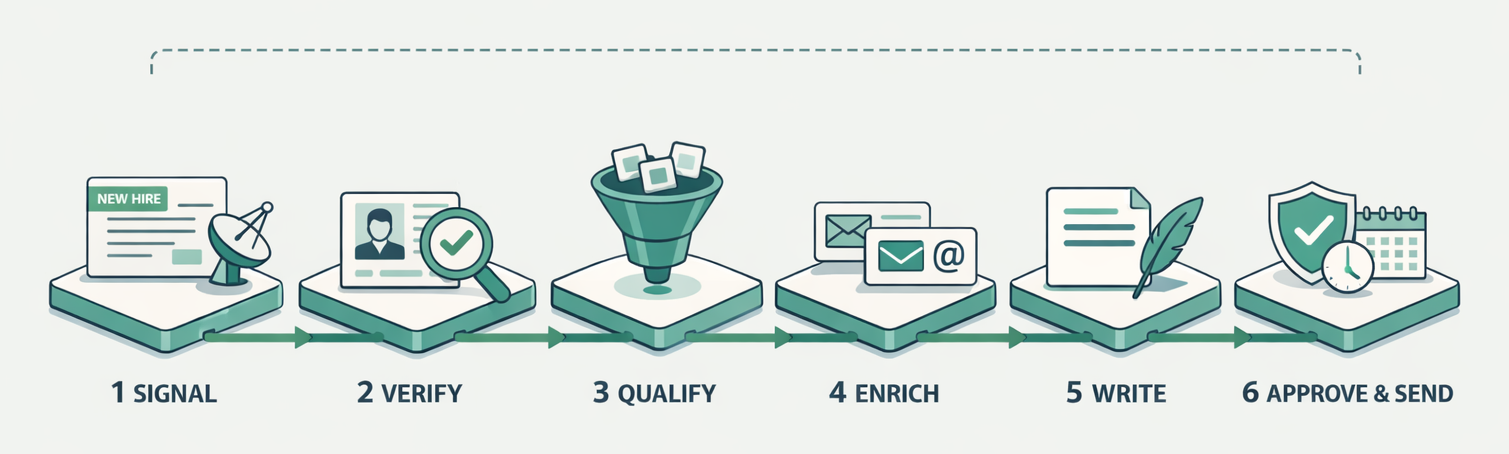
One prompt takes Drevon from a hiring signal to a scheduled email sequence: find the accounts, verify the hire on LinkedIn, score ICP fit, enrich the buyers and draft the emails, with a qualification report you approve before anything sends.
1
Prompt for the whole pipeline
6
Stages from signal to send
0
Emails sent before you approve
60 days
Signal window in the example
Find 100 Series-A B2B SaaS companies that hired their first RevOps or GTM engineer in the last 60 days. Verify each hire on LinkedIn, score ICP fit 1-5 using our ICP doc, and enrich the VP Sales and the new hire via Apollo. For 4+ accounts, write a 3-step sequence on the hiring signal, load it into Instantly, and schedule Tue/Thu 9am ET. Show me the qualification report before anything sends.
TL;DR
- A hiring signal is a better starting point for outbound lead generation than a firmographic filter, because it says why the account might buy now and gives the first line of the email.
- The Drevon prompt on this page runs six stages in one session: signal, verify, qualify, enrich, write, then approve and schedule.
- Every account in the output carries the source link for its signal, so a rep can check the reason before using it.
- Nothing sends until you approve the qualification report. The prompt asks for the report first and schedules sends only after that.
Outbound lead generation is the work of finding accounts that have not asked to hear from you, deciding which of them are worth a message, and putting that message in front of the right person while the reason to talk is still fresh. Drevon runs the whole chain from one prompt, in your own browser and with your own logins, and the Mac app is free to download. The example on this page starts from one trigger, a B2B SaaS company that hired its first RevOps or GTM engineer in the last 60 days, and ends with a scored list of 100 accounts, a three-step sequence for every account that scores 4 or 5, and a report you read before a single email is queued to send.
What signal-based outbound lead generation looks like
Signal-based outbound lead generation starts from an event at the account (a hire, a raise, a job post, a tool change) instead of a static list of companies that fit your size and industry. The event narrows the list to accounts with a reason to act now and hands the writer a specific, checkable opening line.
A firmographic list answers "who could buy". A signal answers "who has a reason to look this quarter". The two work together: the ideal customer profile decides which accounts are allowed on the list at all, and the signal decides which of those get a message this week. The first RevOps or GTM engineering hire is a strong trigger for anyone who sells to go-to-market teams, because the new hire is usually handed the job of fixing the stack and has budget attached to the role.
Hiring is one signal among many. How to Build a Signal-Based Engine Without Intent Data covers the wider set, and 9 LinkedIn Buying Signals for High-Intent Prospecting lists the ones that only show up on LinkedIn. The workflow below works the same way with any of them. Swap the trigger clause and keep the rest.
How to set it up
Setting it up takes one ICP document, the connectors for your enrichment and sending tools, and the prompt. The steps below walk through each clause of the prompt, in the order Drevon runs them, and what the agent writes down at each stage so the final report can show its work.
Step 1: Write the ICP down where the agent can read it
Put your ideal customer profile in a skill or a document the session can open: segment, size band, geography, the titles you sell to, and the disqualifiers. The prompt refers to it as "our ICP doc", so the scoring step uses your definition instead of the model's guess. If there is no written ICP yet, the Ideal Customer Profile skill builds one from your retention and expansion data.
Segment: B2B SaaS, Series A
Headcount: 20-200
Region: United States
Buyer: VP Sales, Head of RevOps, first GTM engineer
Disqualify: agencies, companies with an in-house data team of 5+
Step 2: Connect the tools the prompt names
The example uses Apollo for email enrichment and Instantly for sending. Drevon talks to CRM, enrichment, outreach and analytics tools over MCP, and API keys go into Secrets, added in Drevon 1.4, so they never sit in the prompt. Use whichever enrichment and sending tools you already pay for and change the two names in the prompt to match.
Step 3: Paste the prompt
Tell Drevon Find 100 Series-A B2B SaaS companies (US, 20-200 employees) that hired their first RevOps or GTM engineer in the last 60 days. For each: verify the hire on LinkedIn, pull funding and tech stack, confirm ICP fit using our ICP doc, enrich the VP Sales and the new hire's work email via Apollo, and score each account 1-5. For accounts scoring 4+, write a 3-step cold email sequence that references the hiring signal, load them into Instantly under campaign "RevOps-Q4", and schedule sends Tue/Thu 9am ET. Give me the qualification report before anything sends.
The last sentence matters most. It turns an autonomous run into one with a stop point, which is the same human correction layer described in The AI SDR Shakeout.
Step 4: Watch the six stages run
Drevon works through the list in your browser, where you can watch each step. It searches for the hires, opens each LinkedIn profile to confirm the person and the start date, reads the company's funding and stack, scores fit against the ICP document, enriches the two contacts, and drafts three emails per qualifying account. Each account's row keeps the URL where the hire was confirmed.
Step 5: Read the report, then approve
The session stops at the qualification report. Read the reasons for the 4s and 5s, delete anything you would not stand behind, and edit the emails you want to change. Only then does Drevon load the approved rows into the campaign and set the schedule. Drevon 1.0 added scheduled sessions and notifications when an agent needs a decision, which is what makes the pause practical.
What comes back: the qualification report
The report is one row per account with the signal, the evidence link, the fit score and the reason for the score. It is the document you approve, and the same file becomes the audit trail for why each account was contacted. It lands as CSV and Markdown on your own disk.
This is the shape of the report, with placeholder values.
| Column | Example | Why it is there |
|---|---|---|
| Account | Example Co | The company the row is about |
| Signal | First RevOps hire, started 12 days ago | The reason to reach out now |
| Evidence | LinkedIn profile URL | Lets a rep check the signal in one click |
| Stack and funding | HubSpot, Series A | Context for the first email |
| Fit score | 4 | Your ICP applied to this account |
| Score reason | Right size, US, sells to sales teams | Makes the score arguable |
| Contacts | VP Sales, new hire, with work emails | Who receives the sequence |
| Status | Drafted, awaiting approval | Nothing is queued yet |
A real output from an earlier run of this kind is published as Outbound contacts qualified, so you can see the file before running your own.
Outbound prospecting by hand and with one prompt
Outbound prospecting by hand splits the same six stages across four or five tools and a spreadsheet, with a person moving data between them. The prompt keeps every stage in one session, so the evidence gathered in stage two is still attached to the row when the email is written in stage five.
The table compares where each stage happens in the two setups.
| Stage | By hand | With the Drevon prompt |
|---|---|---|
| Find the signal | Job boards, LinkedIn search, a tracking sheet | Agent searches in your browser |
| Verify the hire | Open each profile, check the start date | Agent opens each profile and records the URL |
| Qualify | Compare each account to the ICP from memory | Scored against the ICP document, with a reason |
| Enrich | Export, upload to an enrichment tool, re-import | Enrichment tool called over its connector |
| Write | Template with a merge field for the company name | Three emails that reference the actual signal |
| Send | Upload a CSV to the sequencer and set a schedule | Loaded and scheduled after you approve |
The by-hand version is the one How a Solo GTM Engineer Can Build a Full Outbound Pipeline describes as a system to assemble. The prompt is that system written as one instruction.
What you need to run it
You need the Drevon Mac app, an AI plan it can drive, an ICP document, and connectors for one enrichment tool and one sending tool. There is no separate AI bill: Drevon runs on the Claude Code, OpenAI Codex, GitHub Copilot, Google Gemini or Antigravity plan you already have.
| Piece | Role in this workflow | What it costs |
|---|---|---|
| Drevon | Runs the agents, reads LinkedIn in your session, writes the report | Free for Mac |
| AI plan you already have | The model behind the agents | Your existing plan |
| Enrichment tool (Apollo in the example) | Work emails for the two contacts | Your existing plan |
| Sending tool (Instantly in the example) | Holds the campaign and the send schedule | Your existing plan |
| ICP document | Defines fit for the scoring step | Your time, once |
Sending volume is its own discipline. If the campaign goes out from a new domain, read Cold email deliverability when you do not own the sending domain before the first Tuesday.
Who uses this
The people who run this workflow own pipeline without owning a large team. Each of them uses the prompt at a slightly different moment.
- GTM engineers who build outbound for the company and want a signal-to-send pipeline they can rerun weekly by changing one clause.
- Founders doing sales themselves, who need 20 good conversations a month and cannot spend a day a week on list building.
- SDR leads preparing a new campaign, who use the report to brief reps on why each account is on the list.
- Agencies running outbound for several clients, who keep one ICP document per client and one prompt per campaign.
When this workflow is the wrong choice
This workflow suits a few hundred accounts a week with a specific reason to reach out to each. It is the wrong tool when you need volume over precision, when no one will read the report, or when the signal does not exist for your market.
- You need tens of thousands of contacts a month. A contact database such as Apollo or ZoomInfo returns large filtered lists faster than an agent verifying each account in a browser.
- No one will review the report. The approval step is the safeguard. Removing it turns this into the kind of unreviewed sending that Is autonomous cold email still allowed in 2026? warns about.
- Your buyers do not hire for the role in the trigger. If first RevOps hires are rare in your segment, pick a signal that is common there, such as a funding round or a job post for the team you sell to.
- You have no ICP document. Scoring against an unwritten profile produces scores nobody can argue with or fix. Write the profile first.
Common questions
What is outbound lead generation?
Outbound lead generation is finding and contacting potential customers who have not come to you first. The seller picks the accounts, usually by fit and by a timely signal, finds the right people, and starts the conversation by email, LinkedIn or phone. Inbound is the reverse: the buyer finds you through content, search or referrals and makes the first move.
What is the difference between outbound prospecting and outbound sales?
Outbound prospecting is the research half: choosing accounts, finding the people and the reason to contact them. Outbound sales covers the whole motion, including the outreach, the follow-up and the conversations that turn into pipeline. The workflow on this page automates prospecting and the first touch, and hands the replies to a person.
Which signals work best for outbound lead generation?
The best signals are recent, checkable and tied to a problem you solve. Hiring for the team you sell to, a funding round, a change in tech stack and a champion moving to a new company are the most common. A signal works when the email can mention it plainly and the reader recognises it as true.
Does Drevon send emails without approval?
Not in this workflow. The prompt ends by asking for the qualification report before anything sends, so the session stops and waits. You review the scores and the drafts, remove what you disagree with, and only the approved rows are loaded into the campaign and scheduled.
Do you need Apollo and Instantly to run this?
No. They are the example tools in the prompt. Drevon connects to enrichment, CRM and outreach tools over MCP, so use the ones you already pay for and change the names in the prompt. The Best Email Enrichment Tools in 2026 benchmark compares the enrichment options.
See this run on your own accounts
Book a live demo and watch Drevon run this workflow against your ICP, with every claim in the output linked to its source.